
SDR CTF: Commercial FM on Linux
Requirements: Linux
Capabilities: Basic reception of RF
Since this is your first step, the goal is to work out the basics of getting the device working with your computer and the installing the software before you begin going after more interesting signals. Here is a simple guide to get you under way, you'll have to scroll down to the Linux section:
http://www.rtl-sdr.com/rtl-sdr-quick-start-guide/
Updating the driver and installing GQRX will get you started. Make sure the driver is talking to your dongle with:
rtl_test -t
Once you set the device correctly and hit play, hopefully you should see something like this:
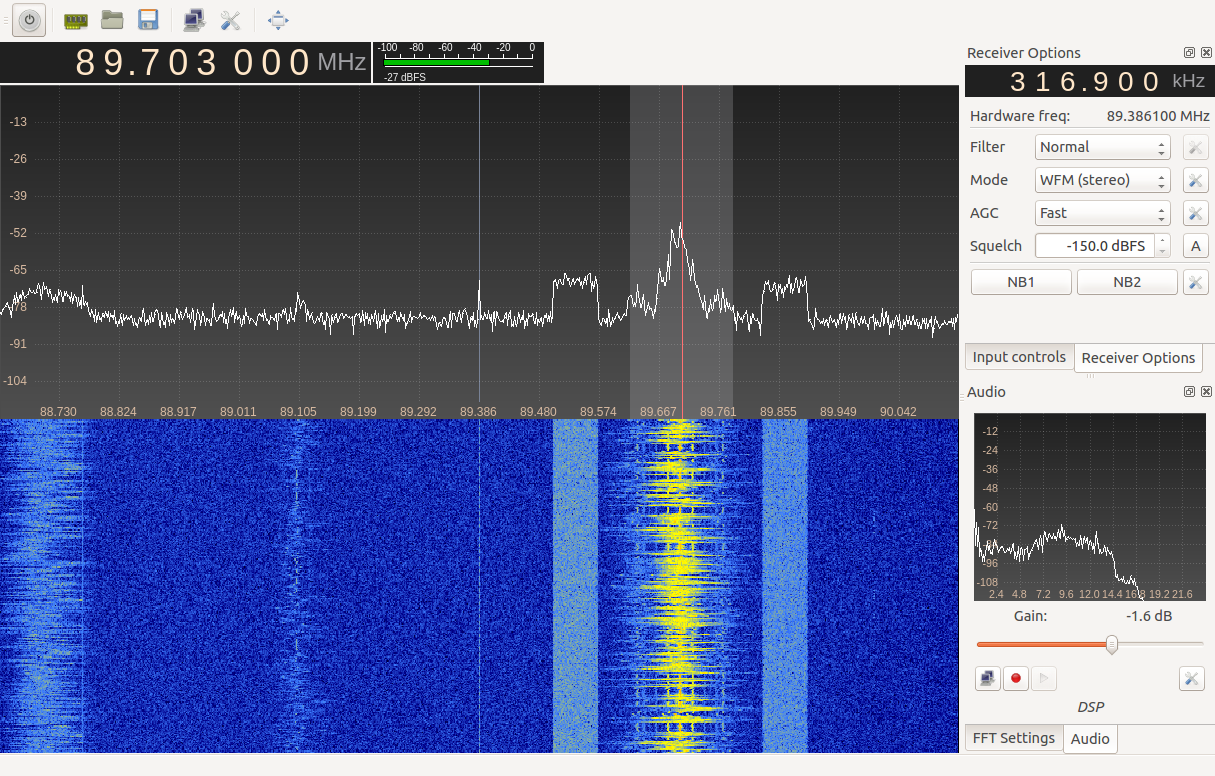
Observe the spike in the center of the waveform plot, this is the DC offset/component/bias introduced by the sampling method used to convert the analog signal to digital. It will follow you around as you tune to different bands like a relentless stalker. This is why I first offset my tuning from the signal that I'm after and then select it visually on the plot to set the tuned frequency.
Still having trouble? If your able to hear static from the software, but can't pick out signals, try improving your antenna. The antennas that come with these devices are usually not that good (if I'm being generous,) and adding any long random length of wire should work for pulling in commercial FM signals.
Next Steps:
Granted this isn't much of an accomplishment to pull in local commercial FM stations, this is merely the first step of hopefully many. As for what to try next, I would take a look at reproducing this on Linux, since some of the flags are easier using Windows. (Commercial FM on Windows)
Did you find that to be too easy? Try it again on "hard-mode" using GNU Radio
What are those interesting bars to the left and right of 89.7 MHz? That's Radio Data Service.
Perhaps you have an interest in Weather Radio?
- Log in to post comments